Skip to product information
1 of 7

AI Business Operating System 2026 - Claude Edition

AI Business Operating System 2026 - Claude Edition

Regular price $29
Regular price Sale price $29
Sale Sold out
Instant download Lifetime access Full resell rights Free future updates
PLR Private Label Rights — rebrand & sell as your own
  • Fully editable with Canva free version
  • Rebrand and sell as your own — keep 100% of the profit
  • Just swap text, colors, and logo — no design skills needed
View full details

Made for small business owners

Stop copy-pasting AI prompts. Install a system.

A 191-page system, 18 installable AI skill files, and 30 image prompts that set up your marketing, sales, support, content, and operations inside Claude — once.

  • Upload a skill file once, Claude keeps it permanently
  • Copy-paste setup, no technical steps
  • Screenshots for every step
AI Business Operating System Claude Edition — master guide, implementation workbook and skills pack, with 191 pages, 18 skills, 30 image prompts and 10 business tools
191 pagesGuide + workbook
18 skill filesUpload & done
30 image promptsFor any image tool
7 modulesOne complete system

Why this is different

Explain your business once, not at the start of every chat.

A prompt is an instruction you have to keep giving. This bundle uses skill files and project setups instead, so the work is already set up when you sit down.

Install, don't repeatUpload a skill file once and Claude uses it automatically from then on.
Sounds like youThe Brand Voice Guardian learns your writing from your own samples.
⏱︎
Finish real tasksEach playbook states its outcome and how long it takes, start to finish.
Follow a planA 30-day calendar gives you one small action per day, in order.

What is included

Everything you get, in detail.

Three files. One guide to read, one workbook to act on, and one folder of files you upload.

The 176-page master guide with 5 project kits, 12 business skills, 10 playbooks and 10 tool recipes
176 pages

The Master Guide

The whole system across 7 parts, with a page-numbered contents page so you can jump straight to what you need. Properly designed pages — step cards, checklists, and copy-and-paste prompt blocks, not a wall of text.

  • 5 project kits — Marketing, Sales, Support, Content, Operations
  • 10 playbooks — each with an outcome, a time estimate and exact prompts
  • 6 research templates and 8 connector workflows
The 15-page implementation workbook showing the 30-day calendar, business audit score and checklists
15 pages

The Implementation Workbook

What to actually do, and in what order. One small action per day — ten to twenty minutes each — so the system is running by day 30 instead of sitting in your downloads folder.

  • The 30-day calendar — day 1 to day 30, in sequence
  • The business audit — score yourself, get your prescription
  • 6 business types — your five highest-value starting points
All 18 installable Claude skills — 12 business and 6 visual — plus the 5 AI project kits
18 skill files

The Skills Vault

The heart of the bundle. Upload a file once and Claude keeps that ability permanently — you never copy-paste a prompt for that job again.

  • 12 business skills — Brand Voice Guardian, Sales Page Writer, Email Sequence Builder, Social Post Multiplier, Customer Reply Pro, Proposal & Quote Generator, Testimonial-to-Copy, Competitor Analyst, Lead Magnet Builder, Content Calendar Planner, Offer & Pricing Strategist, SOP Writer
  • 6 visual skills — for ads, carousels, stories, Pinterest and product visuals
10 business tools Claude builds for you including an ROI calculator, quiz lead magnet, pricing calculator and trackers
10 recipes

Working Tools Claude Builds

Prompts that make Claude build usable tools, not just write about them. No code involved — you describe, it builds, you use it.

  • ROI calculator · quiz lead magnet you can share with customers
  • Pricing & margin calculator · break-even calculator
  • Client onboarding page · invoice tracker · testimonial wall
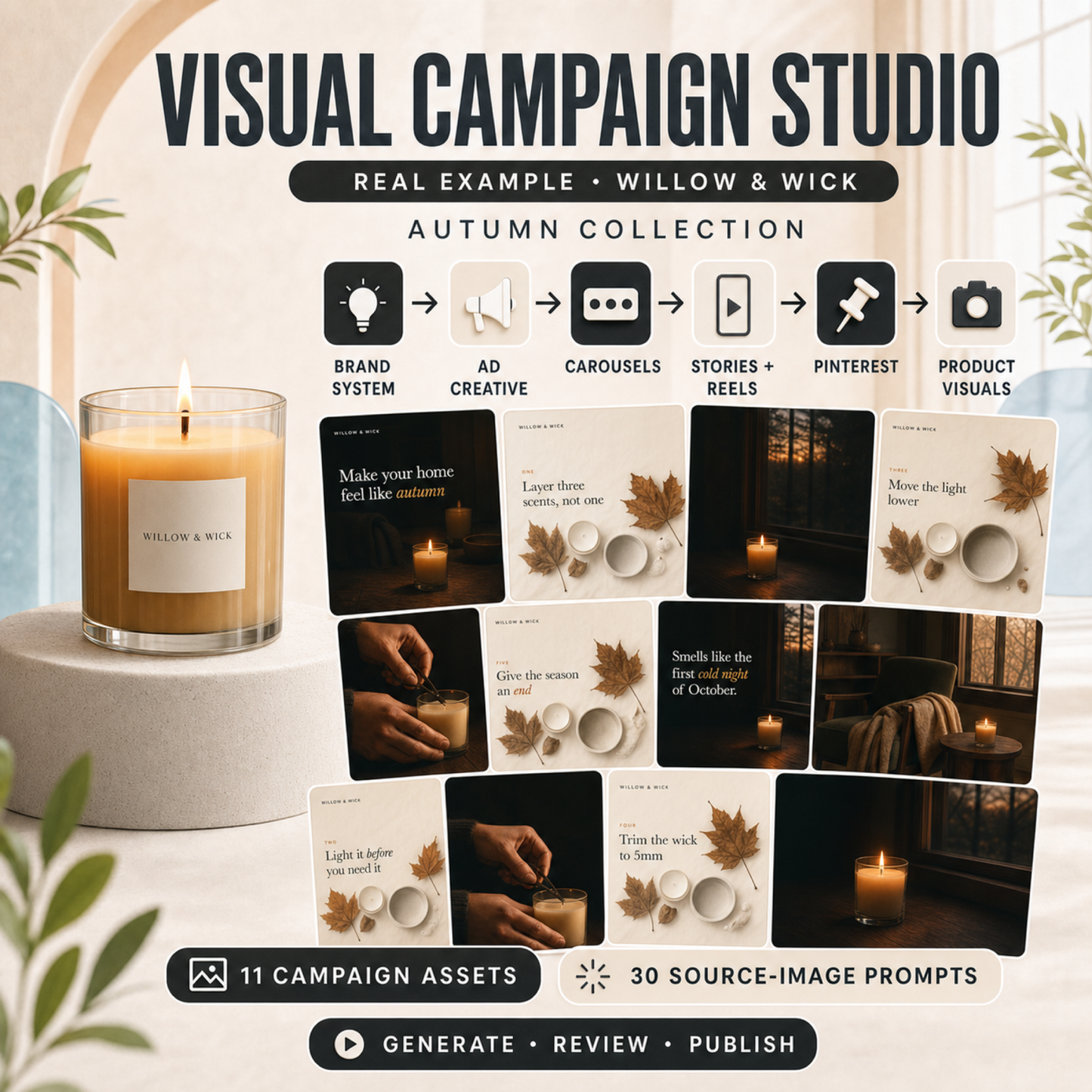
The Willow and Wick autumn collection — 11 finished campaign assets built with the visual campaign studio
6 skills + a worked example

The Visual Campaign Studio

The graphics module. Six more installable skills take one idea from brand system through ads, carousels, stories, Pinterest and product visuals.

  • A complete example campaign — 11 posting-ready assets at true social dimensions
  • 5 design recipes where Claude builds the finished graphic itself
  • Safe zones, true sizes, and text that is actually spelled correctly
30 fill-in image prompts covering backdrops, flat lays, workspaces, hands at work, seasonal scenes and process shots
30 prompts

The Image Prompt Library

Thirty fill-in prompts written to produce clean, usable business photography — with deliberate empty space where your headline goes. Paste them into whichever image tool you already use.

  • Backdrops · flat lays · workspaces · hands at work · seasonal · process shots
  • Supplied as plain text so you are never copying long prompts out of a PDF

Inside the 176-page guide

Seven modules. One system.

01Set Up Your AI Departments5 setups
02The Skills Vault12 skills
03Workflow Playbooks10 playbooks
04Artifact Recipes10 recipes
05Research Command Center6 templates
06Connector Workflows8 workflows
07The Visual Campaign Studio6 skills + 30 prompts

The graphics problem, solved

Text on AI images comes out misspelled. This fixes that.

Image generators paint the look of text rather than setting it, so letters come out wrong. Module 7 splits the job into three steps, and Claude handles the typography.

1 · Claude plans it You get the concept, the copy, and an image prompt written to leave space for your headline.
2 · Your image tool shoots it Paste that prompt into whichever generator you already use, and get a clean photo with no text in it.
3 · Claude sets the type The finished asset is built at true posting size with your colours and correctly spelled text.

Simple to start

From download to your first result in three steps.

1

Open the workbook

Turn to the 30-day plan and do Day 1. It takes about ten minutes.

2

Install your first skill

Upload the Brand Voice Guardian file and give Claude a few samples of your writing.

3

Use it

Ask for a post, an email, or a reply. It arrives in your voice, with no prompt to paste.

Made for your work

Built for people who run the business themselves.

The workbook includes a page that picks your five highest-value starting points based on the kind of business you run, so you are not left guessing where to begin.

  • Coaches
  • Consultants
  • Freelancers
  • Service providers
  • Ecommerce sellers
  • Etsy shops
  • Local businesses
  • Creators
  • Small agencies

Before you buy

What you need to use this.

Worth reading first, so nothing is a surprise after download.

A Claude account Free to create at claude.ai. The free plan covers a good part of the system.
A paid Claude plan for Skills and Projects These two features power the core modules and are not on the free plan. The guide explains the difference honestly before you spend anything.
An image tool, only if you want the visuals Module 7's photo step works with whichever generator you already use. Image generation is not included in this product.
No design software No Canva, no subscriptions to this product, and no technical setup. Mac and Windows.

Ready when you are

Set it up once. Use it every week.

Download the files, follow Day 1 of the 30-day plan, and have your first skill installed today.

✓ 191 pages ✓ 18 installable skills ✓ 30 image prompts ✓ Instant download ✓ One-time payment

Format & delivery: instant digital download. 2 PDF guides and 1 ZIP containing the skill files, plain-text prompt files, and campaign examples. Skill files are supplied as .zip archives containing a SKILL.md, the format Claude accepts for upload. No physical item is shipped.

How it works

1

Buy & download

Get your files the moment you check out — instant access.

2

Customize in Canva

Open in Canva and make it yours. No design skills needed.

3

Brand it & sell

List it as your own and keep 100% of the profit.

Full resell rights included

You're licensed to edit, rebrand, and sell this product as your own — and keep 100% of the profit. Full license terms are included with your download.

Frequently asked questions

Are the templates editable?

Yes — every template is fully editable in Canva. Swap the text, colors, images, and logo in minutes. No design skills required.

Do I need a Canva subscription?

To use and edit the templates yourself, no. They're built entirely on the free version of Canva, so a free account covers you.

To resell them, yes, you'll need a paid Canva plan on your end. Canva requires a paid subscription to share template links, that's simply how their platform works, not a restriction we've added. The good part is this only applies to you as the seller. Your customers only ever need a free Canva account to open and use what you send them.

Can I resell these as my own?

Yes — every product includes resell rights: PLR or MRR. With both you can edit, rebrand, sell as-is or customized, and keep 100% of the profit — with MRR your buyers can resell it too. See the full license breakdown.

Do I get updates for free?

Yes. Whenever a product you own is updated, you get the new version for free — forever.

Is it a one-time payment or a subscription?

One-time payment, lifetime access. No recurring fees.

What is your refund policy?

All sales are final. Because our products are digital and delivered instantly at checkout, we're not able to offer refunds once a purchase is made.

Each bundle's product description clearly shows what's included and how the templates look, so we always recommend reviewing that before you buy. If something is actually wrong with your order, like a broken link or a missing file, contact us and we'll send it immediately for you.

Instant download Full resell rights 200+ Canva bundles No design skills needed Keep 100% of the profit From Viral Content Design